
That old shoebox of prints usually looks manageable until you start pulling photos out one by one. Some are curled. Some have fingerprints. Some are the only copy of a wedding, a baby picture, or a parent who is no longer here. When people compare photo scanning vs phone app options, what they are really asking is this: what is the safest, smartest way to keep these memories alive without making the process harder than it needs to be?
The honest answer is that both methods have a place. A phone app can be useful for quick sharing and simple projects. Professional photo scanning is better when image quality, consistency, and long-term preservation matter. The right choice depends on what you have, how many photos you need digitized, and how much room there is for error.
Photo scanning vs phone app: the real difference
At a glance, both methods turn a printed photo into a digital file. That makes them sound similar, but the experience and the results are not the same.
A phone app uses your phone camera to capture a picture of the print. The app may try to correct glare, crop edges, and improve contrast. It is fast and convenient, especially if you only need a few images for a text message, slideshow, or social post.
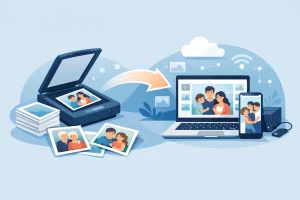
Photo scanning uses equipment designed specifically for printed photographs. A scanner captures the image at a controlled resolution and lighting level, with far more consistency from one photo to the next. That matters when you are preserving a large collection or when the print itself has age-related issues like fading, dust, or delicate edges.
For many families, the difference comes down to purpose. If you want access, a phone app may be enough. If you want preservation, scanning is the stronger choice.
When a phone app makes sense
There is a reason phone scanning apps are popular. They are easy to use, they cost little or nothing to try, and most people already have the device in their pocket.
If you have ten recent prints in good condition and you want to email them to relatives tonight, a phone app can work well enough. It can also help when you are sorting a collection and want quick reference copies before making decisions about what to digitize professionally.
For casual use, the speed is appealing. You can place a photo near a window, snap it, let the app auto-crop, and move on. For some households, that simplicity is the whole point.
But convenience has trade-offs. Results can vary depending on lighting, shadows, hand movement, camera quality, and how well the app interprets the edges of the print. One image may look fine, while the next has glare across a face or cuts off part of the border. If you are working through hundreds of photos, those small inconsistencies add up fast.
Where phone apps fall short
The biggest issue is control. A phone app is doing its best in a less-than-ideal setup. Even in a bright room, reflections can show up on glossy prints. Slight angles can distort the image. Auto-enhancement can change colors or wash out detail.
Older photographs are often less forgiving. Faded snapshots, textured paper, tiny wallet prints, and photos with curled corners can be difficult for apps to capture cleanly. If the original is already losing detail, a weaker digital copy does not help preserve what is left.
There is also the time factor. People often assume phone apps are always faster, but that is mostly true for small batches. Once you are handling albums, loose prints, duplicates, and fragile originals, the stop-and-start process becomes tedious. You may spend more time retaking photos, adjusting lighting, and fixing crops than expected.
And then there is file organization. Quick phone captures can leave you with mixed file names, inconsistent image sizes, and photos scattered across your camera roll. That may be fine for a handful of images, but it becomes frustrating when you are trying to create a lasting digital archive.
Why professional photo scanning still matters
Professional photo scanning is built around preservation, not just convenience. The goal is to create a digital version that is faithful to the original print and useful for years to come.
That starts with better capture quality. Dedicated scanning equipment can produce sharper detail, more accurate color, and more even results across an entire collection. If your photos include group portraits, handwritten notes on the border, or subtle background details, those things are more likely to be retained.
It also brings consistency. When a family wants boxes of prints digitized, they usually do not want 300 files that all look slightly different because the room lighting changed or the angle shifted. They want a collection that feels organized and dependable.
Most important, professional handling reduces the risk of damage. Older photos can stick together, crack at the edges, or bend easily. Care matters. For families who are working with one-of-a-kind originals, that peace of mind is often just as valuable as the digital files themselves.
Quality is not just about sharpness
People often reduce this decision to resolution, but the real issue is whether the digitized image feels true to the memory. A photo can look technically sharp and still be disappointing if the colors are off, the borders are clipped, or glare hides part of a face.
That is where photo scanning vs phone app comparisons become more practical than technical. You are not only choosing a tool. You are choosing how much fidelity you want from the final result.
For newer prints in excellent shape, the gap may feel smaller. For older family photos, especially those stored for decades in drawers, envelopes, or albums, the gap tends to widen. Wear, fading, and print texture expose the limits of app-based capture very quickly.
Cost, time, and peace of mind
A phone app usually looks cheaper at first because the upfront cost is low. But your own time has value. If you spend several weekends photographing prints, correcting mistakes, renaming files, and still feel unsure about the quality, the savings may not feel like savings anymore.
Professional scanning costs more because it includes specialized equipment, careful handling, and a more reliable final product. That does not mean everyone needs it for every photo. It means the value shows up differently.
If you have a small stack of non-essential prints, a phone app may be enough. If you have irreplaceable family photos, large volumes, or aging originals, paying for quality can prevent regret later. Once a print fades further, gets damaged, or disappears, there is no second chance to digitize it well.
Which option is right for your collection?
If your goal is quick sharing, a phone app can be a reasonable short-term solution. It is especially useful for a few photos that are clean, flat, and not historically important to the family archive.
If your goal is to preserve originals, create a dependable digital collection, and avoid quality issues, professional scanning is the better path. That is especially true for older prints, large batches, albums, and photos with emotional or historical value.
Some families choose a mix. They use a phone app for immediate access to a few favorites, then have the full collection scanned properly. That approach can make sense if you want quick results now without compromising the long-term project.
For households in South Florida who want a local, careful option, working with an experienced media preservation company can remove much of the stress from the process. Instead of guessing whether each image came out well enough, you can focus on what matters most – protecting the stories those photos carry.
The better question to ask
Instead of asking which method is easier, ask what these photos need from you right now. If they are recent and replaceable, convenience may be enough. If they are fragile, rare, or deeply personal, they deserve more than a quick camera capture.
The best digitizing choice is the one that respects both the condition of the originals and the importance of the memories in them. Years from now, when family members open those files, you want them to see the image clearly and feel that it was cared for from the start.